Chromium 用户界面分析(1)

基础界面库的类结构

基础界面库位于src\ui\views目录下,定义了 跨平台 的组件,是Chromium界面的基础,顶层chrome/browser/ui/下的类都继承或使用这些基础类。

关于Widget静态图

下面是Widget及内部结构的类图,类关系做了简化,只显示较关键的联系。
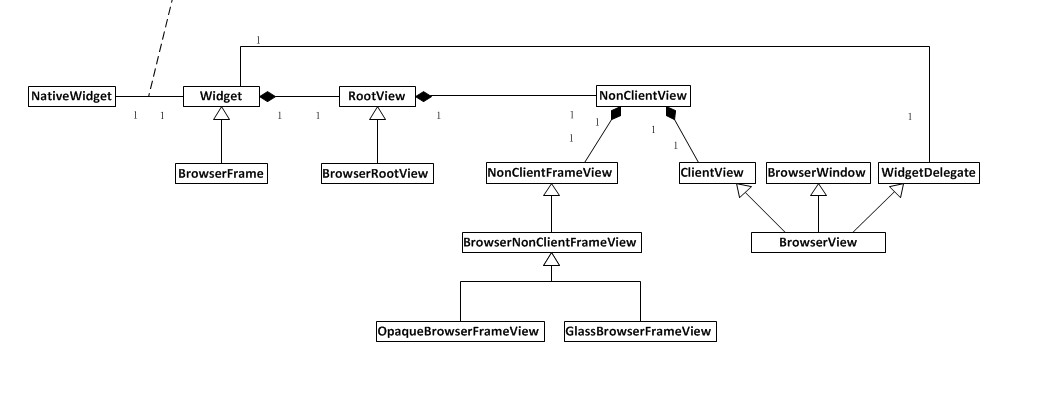
chromium ui hierarchy

Widget内组件布局

  • 总体来说,Widget是最底层的UI组件(此处不区分Widget和NativeWidget,后面讨论其关系),与本地(Native)平台交互,处理平台相关的消息、事件等,转换到Chromium UI体系内。
  • 为了统一处理视图组件的消息事件,Widget内定义了一个根视图RootView
  • NonClientView是RootView的唯一孩子,也是其它所有视图的逻辑根 (为什么RootView和NonClientView不合并为一个视图?
  • NonClientFrameView 是NonClientView孩子之一,负责非客户区的绘制和消息处理,根据不同的系统会有不同的实现,比如Windows下有OpaqueFrameView和GlassFrameView,非客户区一般包括窗口控制按钮(最大化,最小化,关闭)和标题栏(Title bar)
  • ClientView 是另一个孩子,负责客户区的绘制和消息处理,客户区包括工具栏、标签栏、地址栏、页面等。


//  The NonClientView is the logical root of all Views contained within a
//  Window, except for the RootView which is its parent and of which it is the
//  sole child. The NonClientView has two children, the NonClientFrameView which
//  is responsible for painting and responding to events from the non-client
//  portions of the window, and the ClientView, which is responsible for the
//  same for the client area of the window:
//
//  +- views::Widget ------------------------------------+
//  | +- views::RootView ------------------------------+ |
//  | | +- views::NonClientView ---------------------+ | |
//  | | | +- views::NonClientFrameView subclas  ---+ | | |
//  | | | |                                        | | | |
//  | | | | << all painting and event receiving >> | | | |
//  | | | | << of the non-client areas of a     >> | | | |
//  | | | | << views::Widget.                   >> | | | |
//  | | | |                                        | | | |
//  | | | +----------------------------------------+ | | |
//  | | | +- views::ClientView or subclass --------+ | | |
//  | | | |                                        | | | |
//  | | | | << all painting and event receiving >> | | | |
//  | | | | << of the client areas of a         >> | | | |
//  | | | | << views::Widget.                   >> | | | |
//  | | | |                                        | | | |
//  | | | +----------------------------------------+ | | |
//  | | +--------------------------------------------+ | |
//  | +------------------------------------------------+ |
//  +----------------------------------------------------+
//
// The NonClientFrameView and ClientView are siblings because due to theme
// changes the NonClientFrameView may be replaced with different
// implementations (e.g. during the switch from DWM/Aero-Glass to Vista Basic/
// Classic rendering).

类关系(Class Relationship)的建立

1
2
3
4
5
6
7
8
9
10
11
12
13
14
15
16
17
18
19
20
21
22
23
24
25
26
27
28
29
30
31
32
33
34
35
36
37
38
39
40
41
42
43
44
45
46
47
48
49
50
51
52
53
54
55
56
57
58
59
60
61
62
63
64
65
66
67
68
69
70
71
72
73
74
75
76
77
78
79
80
81
82
83
84
85
86
87
88
89
90
91
92
93
94
95
96
97
98
99
100
101
102
103
104
105
106
107
108
109
110
111
void Widget::Init(const InitParams& params) {
...
root_view_.reset(CreateRootView()); -->1
...
if (RequiresNonClientView(params.type)) {
non_client_view_ = new NonClientView; -->2
non_client_view_->SetFrameView(CreateNonClientFrameView()); -->3
// Create the ClientView, add it to the NonClientView and add the
// NonClientView to the RootView. This will cause everything to be parented.
non_client_view_->set_client_view(widget_delegate_->CreateClientView(this)); -->4
SetContentsView(non_client_view_); -->5
...
} else if (params.delegate) {
SetContentsView(params.delegate->GetContentsView());
...
}
...
}
```

1. Create root view
1. Create NonClientView and make Widget::non_client_view_ point to it
1. Create NonClientFrameView and add it to NonClientView
1. Create ClientFrameView and add it to NonClientView
1. Add NonClientView to RootView

### RootView类
要注意的几点:
- 从名字便可知,RootView是View体系(hierarchy)的根
- RootView起到中转的作用,把本地Widget相关的事件等转换到Chromium View体系中
- RootView只有一个孩子ContentView,大小正好布满整个区域

原文:

// RootView class
//
// The RootView is the root of a View hierarchy. A RootView is attached to a
// Widget. The Widget is responsible for receiving events from the host
// environment, converting them to views-compatible events and then forwarding
// them to the RootView for propagation into the View hierarchy.
//
// A RootView can have only one child, called its "Contents View" which is
// sized to fill the bounds of the RootView (and hence the client area of the
// Widget). Call SetContentsView() after the associated Widget has been
// initialized to attach the contents view to the RootView.
//

### Widget和NativeWidget的关系

Chromium UI的一个目标是实现 **跨平台** ,这样就抽象出一个与平台无关的Widget,而与平台相关特性则由NativeWidget处理。它们两个一一对应,可以设置为Widget拥有(owns)NativeWidget或NativeWidget拥有Widget。

////////////////////////////////////////////////////////////////////////////////
// Widget class
//
// Encapsulates the platform-specific rendering, event receiving and widget
// management aspects of the UI framework.
//
// Owns a RootView and thus a View hierarchy. Can contain child Widgets.
// Widget is a platform-independent type that communicates with a platform or
// context specific NativeWidget implementation.
//
// A special note on ownership:
//
// Depending on the value of the InitParams' ownership field, the Widget
// either owns or is owned by its NativeWidget:
//
// ownership = NATIVE_WIDGET_OWNS_WIDGET (default)
// The Widget instance is owned by its NativeWidget. When the NativeWidget
// is destroyed (in response to a native destruction message), it deletes
// the Widget from its destructor.
// ownership = WIDGET_OWNS_NATIVE_WIDGET (non-default)
// The Widget instance owns its NativeWidget. This state implies someone
// else wants to control the lifetime of this object. When they destroy
// the Widget it is responsible for destroying the NativeWidget (from its
// destructor).
//

&nbsp;
&nbsp;
&nbsp;

## Chromium界面的类结构

### 静态图
![chromium browser hierarchy](/images/posts/chromium_browser_hierarchy.jpg)

### 类关系(Class Relationship)的建立
1. Enter "Browser::Create" method
1. Call "InitBrowserWindow"
1. Call "CreateBrowserWindow" with the parameter "browser"(this)
1. Create "BrowserView" which is the subclass of "BrowserWindow"
1. Set up the relation of "BrowserView" and "BrowserFrame"
1. Return back the "Browser::window_" to "BrowserView" instance

Pseudo code:

```cpp
Browser::Create(){ -->1
...
browser->InitBrowserWindow(){ -->2
...
browser.window_ = BrowserWindow::CreateBrowserWindow(browser){ -->3,6
BrowserView* view = new BrowserView(browser); -->4
(new BrowserFrame(view))->InitBrowserFrame(); -->5
...
return view; -->6
}
...
}
...
}


总结

Chromium UI的目标是一套跨平台的方案,其中NativeWidget实现了平台相关的细节,Widget才是跨平台的组件,与NativeWidget做了映射。Widget是Windows组件,而Chromium UI的其它组件都是基于View建立的,所以需要一个RootView做中转,将窗口事件转换到View体系中,又作为其它View的根。